

Skip to main content Skip to search

PhonEX ONE has been supporting Microsoft Teams, in hybrid and Teams Only configuration, monitoring Agents, Queues, Auto Attendants

and calls made*. Constantly looking to the future and seeking to actively expand the current support for Microsoft Teams, we are now integrating

the new Microsoft Graph API for Microsoft Teams CDRs for the Teams Only configuration. This will feature a new quality of calls

in the existing reports as well as in a new dedicated one which, alongside the existing widgets and reports for agents / queues /

auto-attendants, will provide a true 360° view of MS Teams usage.

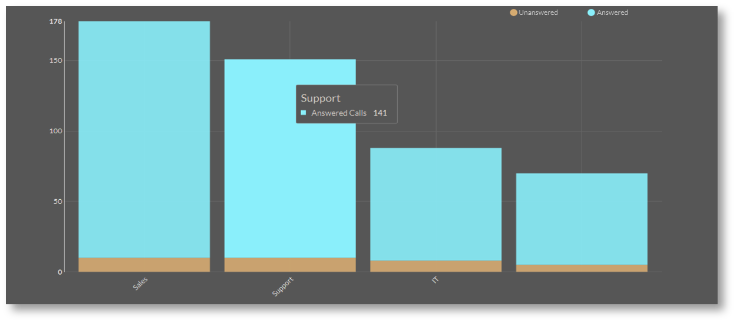
Dashboard Widgets

Microsoft Teams Historical Dashboard solution

gives users the option to obtain statistics on auto-

attendant / queue / agent performance, such as: answered

or missed opportunities, caller experience and promptness

in finding a resolution for incoming requests.

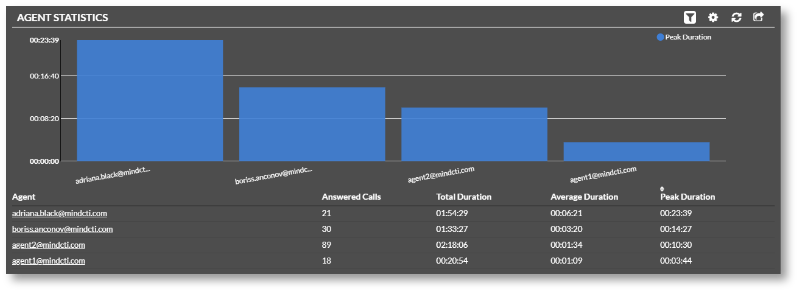
Agent Statistics Reports

PhonEX ONE delivers specialized reports from

the Agent’s perspective to monitor the Agents’

performance and asses their efficiency.

The Agent Statistics report displays statistics

for agents that are part of a queue, while its

detailed version (Agent Details) offers details

about call by call agents’ traffic, including

the agent who answered the call.

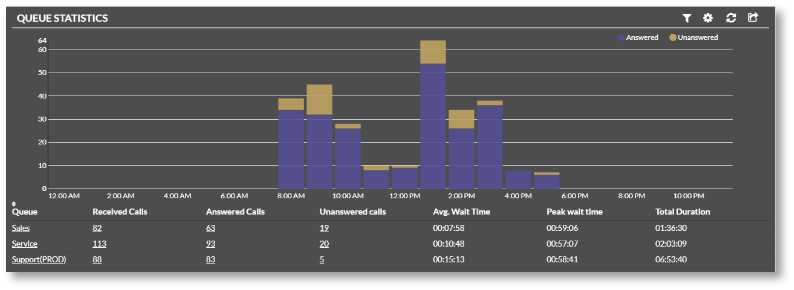
Queue Statistics Reports

PhonEX ONE provides dedicated statistics / detailed

reports to supervise the activity on used Queues on

Microsoft Teams. The Queue Statistics report delivers

basic statistics on the Microsoft Teams queues and can be

filtered by caller, auto-attendant, queues, agents, wait-time

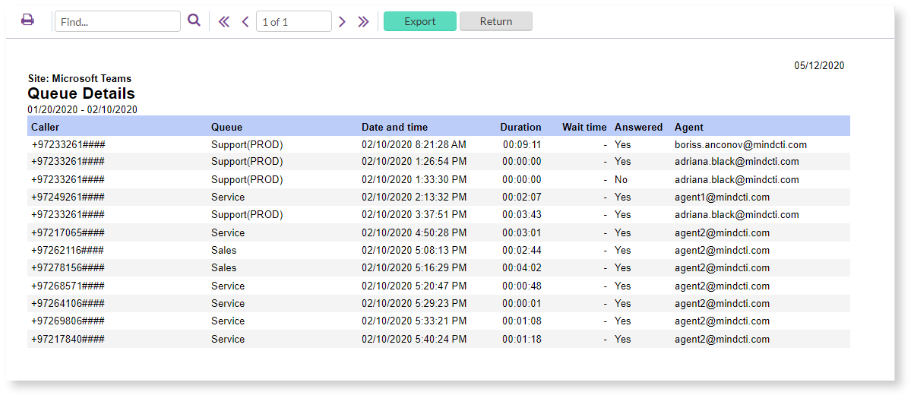
and scenario resolution, while he Queue Details report

offers details about the queue / auto-attendant number

the calling party has dialed, call date and duration,

as well as call resolution (answered or unanswered)

and agent that answered the call.

Seamless User Experience

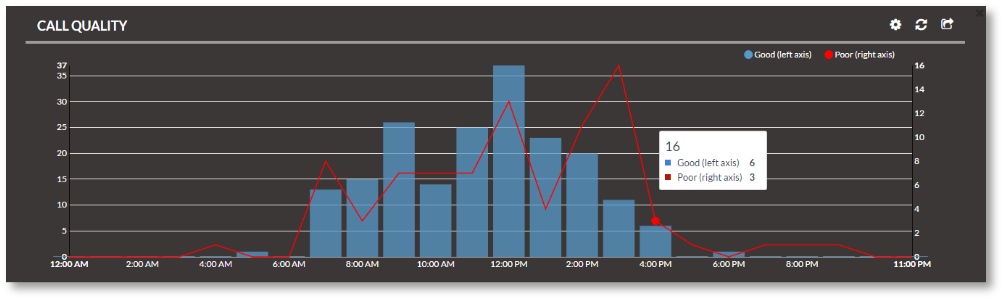
Maintaining quality standards for both internal and external communication is a key component of a successful customer experience.

PhonEX ONE’s call quality monitoring options measure the end-user experience when using the common unified communications platform

features. All unfavorable user events are analyzed based on the network and application characteristics and offered for easy analysis

in reports and wallboards. The Call quality Dashboard widgets make it faster and easier than ever for system administrators

to pinpoint spikes of choppy communication and identify problem areas, while PhonEX ONE’s flexible reporting interface

offers the ability to create and deploy custom reports that include quality statistics at device / gateway level.

Call Accounting

Part of PhonEX ONE’s capabilities is collecting and

processing calls, providing call accounting as well as a

variety of built-in reports for a quick insight into call cost

and call information, enabling chargeback, traffic

analysis and cost control.

Exports to Microsoft

Teams Channels

Microsoft Teams channels are already suitable destinations

for all reports, charts and widgets available in PhonEX ONE.

UC metrics widgets and reports, either historical or real-

time, can be exported for further analysis to specific

Microsoft Teams channel(s) directly from the

application interface. This function is available

in the Export selection menu for reports and via

the export icon in the upper-right corner of widgets.

A message can also be associated with the exported data.

* The collection and processing of monitored calls for the Teams Only scenario will be

available for all customers as soon as Microsoft releases Teams API for general availability.

MINDCTI